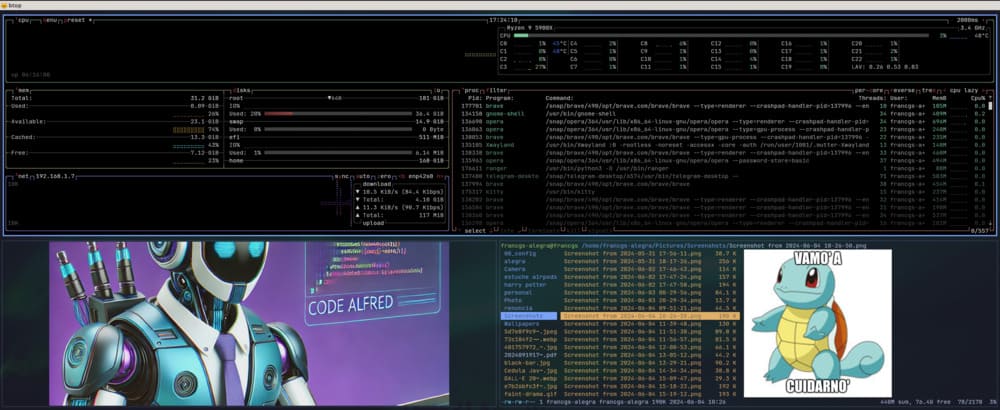
Quieres una terminal rapida, bonita y personalizable en Ubuntu 24.04? Esta guia usa Kitty + Ranger, con preview de imagenes, fuente JetBrains Mono y tema Tokyo Night.
Paso 1: Instalar Kitty
sudo apt install kittyPaso 2: Configurar kitty.conf
Crea o edita:
~/.config/kitty/kitty.confEjemplo base:
# Kitty configuration
font_family      JetBrainsMono-ExtraLight

font_size        11.0

window_border_width 2pt
window_margin_width 2
window_padding_width 1

background_opacity 0.9

# BEGIN_KITTY_THEME
# Tokyo Night
include current-theme.conf
# END_KITTY_THEME
Paso 3: Agregar tema Tokyo Night
Archivo:
~/.config/kitty/current-theme.confContenido:
# vim:ft=kitty

## name: Tokyo Night
## license: MIT
## author: Folke Lemaitre
## upstream: https://github.com/folke/tokyonight.nvim/raw/main/extras/kitty/tokyonight_night.conf


background #1a1b26
foreground #c0caf5
selection_background #283457
selection_foreground #c0caf5
url_color #73daca
cursor #c0caf5
cursor_text_color #1a1b26

# Tabs
active_tab_background #7aa2f7
active_tab_foreground #16161e
inactive_tab_background #292e42
inactive_tab_foreground #545c7e
#tab_bar_background #15161e

# Windows
active_border_color #7aa2f7
inactive_border_color #292e42

# normal
color0 #15161e
color1 #f7768e
color2 #9ece6a
color3 #e0af68
color4 #7aa2f7
color5 #bb9af7
color6 #7dcfff
color7 #a9b1d6

# bright
color8 #414868
color9 #f7768e
color10 #9ece6a
color11 #e0af68
color12 #7aa2f7
color13 #bb9af7
color14 #7dcfff
color15 #c0caf5
Paso 4: Instalar fuente JetBrains Mono
Descarga JetBrains Mono ExtraLight, extrae y copia los .ttf:
sudo mkdir -p /usr/share/fonts/JetBrainsMono-ExtraLight
sudo cp -r JetBrainsMono-ExtraLight/ttf/* /usr/share/fonts/JetBrainsMono-ExtraLight/
Paso 5: Agregar aliases de Kitty en .bashrc
alias icat='kitten icat'
alias s='kitten ssh'
Recarga shell:
source ~/.bashrcPaso 6: Instalar Ranger
sudo apt install rangerCopia configuracion por defecto:
ranger --copy-config=allPaso 7: Habilitar preview de imagenes en Ranger
Edita ~/.config/ranger/rc.conf y agrega:
set preview_images_method kitty
set preview_images true
Recarga shell:
source ~/.bashrcPaso 8: Ejecutar Ranger
rangerDeberias ver previews de imagenes en el panel de previsualizacion.
Conclusion
Con esta configuracion tienes una terminal moderna, rapida y visual para trabajo diario con archivos y desarrollo.
Happy reading! ☕
Comments